NLIS Support
A range of how-to guides are available to assist producers with using the NLIS to record livestock movements onto and off their property identification code (PIC).
Contact ISC Customer Service
8am-7pm (AEST) Monday - Friday
or
9am-5pm (AEST) Saturdays - Sundays
Ph: 1800 683 111
Email: info@integritysystems.com.au
Before you call us, note your User ID and the Upload ID for any transactions you want to discuss. You may also need the livestock device numbers mentioned in any NLIS email messages you have received about the transaction.
Trouble accessing the NLIS database?
The NLIS website is not fully compatible with some older internet browsers, so you should always ensure that you are using the latest version of your internet browser when you visit nlis.com.au
To check if your current internet browser is up to date, visit www.whatismybrowser.com. For assistance with upgrading your browser, contact your local IT provider.
The NLIS database will be unavailable between 6-8pm (AEDT) every second Thursday and select Saturdays between 10am-8pm (AEDT) for maintenance.
View the NLIS maintenance dates.
Warning emails
These messages are generated automatically by the NLIS Database when a discrepancy arises in an animal's movement history.
The fact that you have received this email message indicates that your PIC is featured somewhere in the animal's life history.
Below is an example of the type of situation that will generate a 'Warning' email:
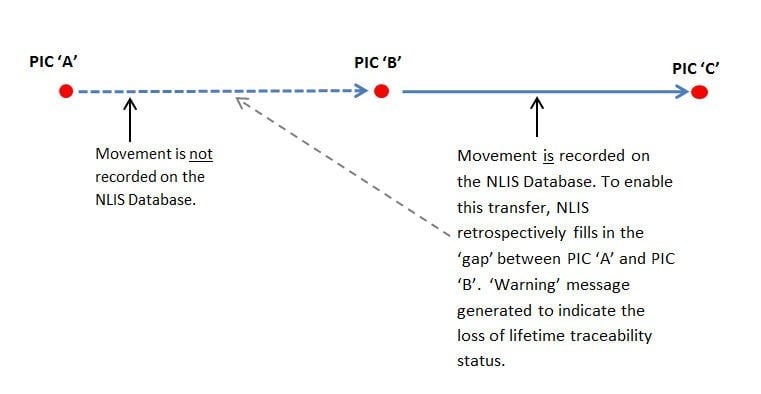
You are not required to do anything in response to this email, however, the email contains valuable information to assist you in investigating the message, such as the PICs involved.
These PICs can be investigated on the NLIS PIC register to determine the entities involved. For instructions on how to do this refer to the Tech Tip – ‘Search the PIC Register’.
Reconciling the devices that are physically on your property against the devices registered to your NLIS Database account may be of assistance. Access information on how to complete a PIC reconciliation.
For more information on any 'Warning' emails you have received, please contact ISC Customer Service on 1800 683 111, or via support@integritysystems.com.au between 9am and 5pm (AEDT, Monday to Friday.
Please have the email you received handy when you call.
