Adding sheep and goats to your NLIS account
Mandatory electronic identification (eID) for sheep and goats will be fully implemented nationally on 1 January 2027.
To review the most up-to-date information on the rollout, please refer to the Sheep and Goat eID National Implementation Plan.
Identifying your sheep and goats
Sheep and goats requiring tags need to be identified with sheep and goat specific electronic National Livestock Identification System (NLIS) accredited devices.
Regardless of when they were born, all sheep and goats (with the exception of harvested rangeland goats) will need to be tagged with an eID device by 1 January 2027.
Updating your NLIS profile
If you move sheep or goats with eIDs onto your property, you will need to transfer those device numbers onto your Property Identification code (PIC) using your NLIS account.
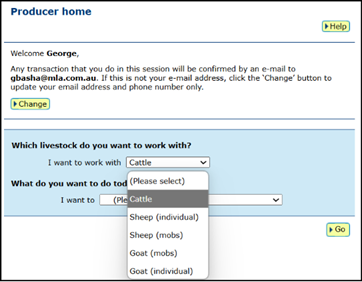
If your account does not have the option to select Sheep (individual) and/or Goat (individual) from the livestock dropdown menu, you may not be set up to record individual device numbers.
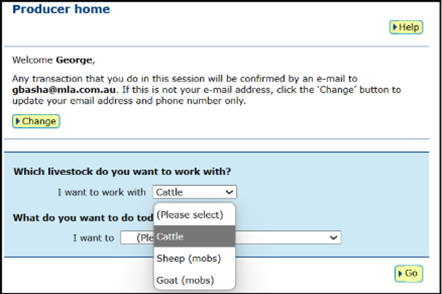
It’s easy to add this option to your NLIS account, by following these two steps.
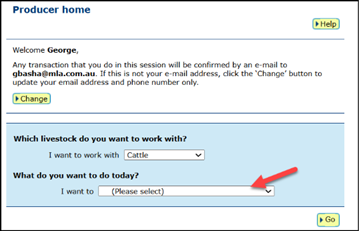
1. From the Home Page, select ‘I want to’ and select ‘Change my types of livestock’ from the Account Management option on your NLIS homepage.
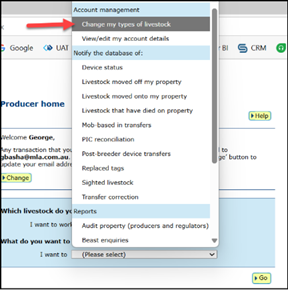
2. Tick the appropriate boxes and then select Continue.
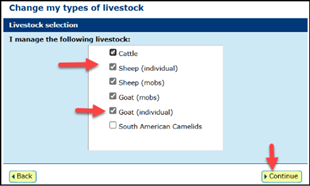
You will now be able to select sheep and goat device numbers when you are transferring these onto your PIC using your NLIS account.